api를 받아왔으니 스타일을 웹앱 형식으로 꾸미고자 한다.
emtion theme을 이용하여 일관성있게 스타일을 적용했다.
global.tsx와 Layout.tsx를 이용해 공통 컴포넌트 스타일을 적용했다.
*,
*::before,
*::after {
  box-sizing: border-box;
}
Layout.tsx의 padding과 margin이 전체 사이즈에 계속 포함되어 결과가 없는 빈 화면에서도 커서가 생성되었다.
padding과 margin을 포함하기 위해 box-sizing을 border-box로 설정하였다.
global.tsx에 설정했다.
또한, search Input에 소환사명을 적고 엔터를 눌렀을 때 검색 버튼이 누르도록 설정하고자 했다.
import { SearchButton, SearchNameInput, SearchWrapper } from '@/pages/user/styles/search.styles.ts';

type SearchProps = {
  setUserName: (value: string) => void;
  onClickHandle: () => void;
};

export default function Search({ setUserName, onClickHandle }: SearchProps) {
  const handleKeyDown = (e: React.KeyboardEvent<HTMLInputElement>) => {
    if (e.key === 'Enter') {
      onClickHandle();
    }
  };

  return (
    <SearchWrapper>
      <SearchNameInput
        type="text"
        placeholder="소환사 이름을 입력하세요"
        onChange={(e) => setUserName(e.target.value)}
        onKeyDown={handleKeyDown}
      />
      <SearchButton onClick={onClickHandle}>검색하기</SearchButton>
    </SearchWrapper>
  );
}
input에 onKeyDown 이벤트를 설정한다.
e는 키보드 이벤트를 나타낸다. 만약 e.key가 엔터이면 버튼 이벤트를 활성화시킨다.
매치 상세 정보 스타일을 적용해야 한다.
그 전에 매치 정보를 정리 해야 한다.
export const MATCH_INFO = (matchId: string) =>
  `https://asia.api.riotgames.com/lol/match/v5/matches/${matchId}?api_key=${LOLAPI}`;

여기서 불러온 데이터가 매우 많기 때문에 관리해야한다.
import { formatDistanceToNow } from 'date-fns';
import { ko } from 'date-fns/locale';
import { formatGameDuration } from '@/hooks/fetch/useTimeModeChange.ts';
import { QUEUE_TYPE_MAP } from '@/constant/map.ts';

export default function useMatchDetail({ matchInfo, puuidData }) {
  // 검색 유저 정보
  const me = matchInfo.info.participants.find((p) => p.puuid === puuidData.puuid);
  console.log("me", me);

  // 아군 팀
  const allyTeam = matchInfo.info.participants.filter(p => p.teamId === me.teamId);
  console.log("allyTeam", allyTeam);

  // 적 팀
  const enemyTeam = matchInfo.info.participants.filter(p => p.teamId !== me.teamId);
  console.log('enenmyTeam', enemyTeam);

  // 승패
  const gameResult = me.win ? '승리' : '패배';
  console.log(gameResult);

  // 게임 종류
  const gameType = QUEUE_TYPE_MAP[matchInfo.info.queueId] || '기타';
  console.log(gameType);

  // 게임 시간
  const gameDuration = formatGameDuration(matchInfo.info.gameDuration);
  console.log(gameDuration);

  // 현재로부터 며칠 전 게임인지
  const timeAgo = formatDistanceToNow(new Date(matchInfo.info.gameEndTimestamp), {
    addSuffix: true,
    locale: ko,
  });
  console.log(timeAgo);

  // kda
  const kda = me.challenges.kda.toFixed(2);
  console.log(kda);

  // 킬 관여율
  const killParticipation = Math.round(me.challenges.killParticipation * 100);
  console.log(killParticipation);

  // cs
  const totalCS = me.totalMinionsKilled + me.neutralMinionsKilled;
  console.log(totalCS);

  // item slot
  const items = [me.item0, me.item1, me.item2, me.item3, me.item4, me.item5, me.item6].filter(
    (id) => id !== 0
  );
  console.log(items);

  return { me, allyTeam, enemyTeam, gameResult, gameDuration, timeAgo, kda, totalCS, items, killParticipation, gameType };
}
우선 기본적인 데이터를 가져왔다.
데이터가 많기 때문에 ai를 통해 기본적인 데이터가 무엇인지 추려내었다.
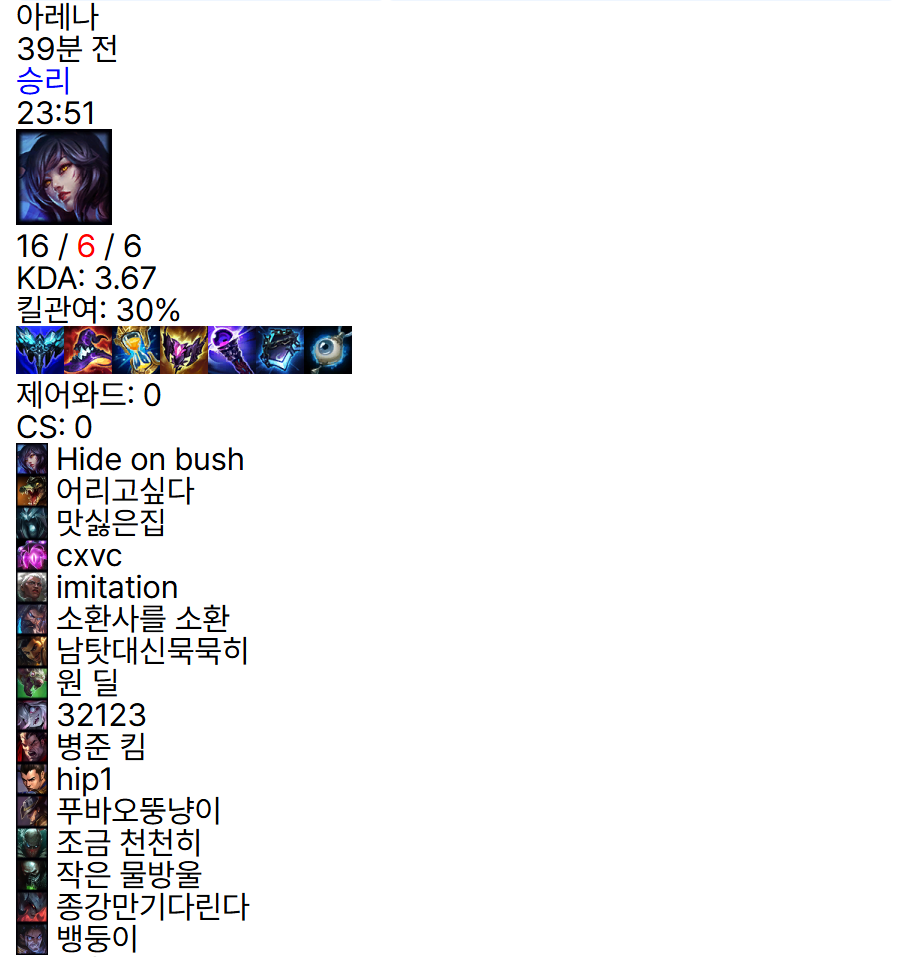
다음 데이터에서 나온 결과들이다.
이제 스펠과 룬에 대한 정보를 가져와야 한다.
스펠
ddragon.leagueoflegends.com/cdn/15.15.1/data/ko_KR/summoner.json
룬
ddragon.leagueoflegends.com/cdn/15.15.1/data/ko_KR/runesReforged.json
스펠에 대한 정보는 다음과 같이 불러온다.
import useFetch from '@/hooks/fetch/useFetch.ts';
import { SPELL_INFO } from '@/api/url.ts';

export default function useSpellInfo() {
  const { data, isLoading, isError } = useFetch({
    key: 'spellInfo',
    value: '',
    url: SPELL_INFO,
    options: {
      enabled: true,
    },
  });

  const findSpellImage = (id: number) => {
    if (!data || !data.data) return undefined;
    return Object.values(data.data).find((spell) => Number(spell.key) === id).image.full;
  };

  return {
    spellData: data,
    spellDataIsLoading: isLoading,
    spellDataIsError: isError,
    findSpellImage,
  };
}
스펠 키와 id가 같은 것을 찾아서 해당 객체에 있는 image.full을 가져오는 형식으로 한다.
스펠은 할만했다.
하지만 룬 정보는 주요 룬 배열 안에 또 세부 룬 배열이 있어서 가져오기가 복잡했다.
import useFetch from '@/hooks/fetch/useFetch.ts';
import { RUNES_INFO } from '@/api/url.ts';

export default function useRuneInfo() {
  const { data, isLoading, isError } = useFetch({
    key: 'runeInfo',
    value: '',
    url: RUNES_INFO,
    options: {
      enabled: true,
    },
  });

  const runeArray = data?.data;

  const findRuneImage = (id: number) => {
    if (!runeArray) return null;
    for (const tree of runeArray) {
      for (const slot of tree.slots) {
        const rune = slot.runes.find((r) => r.id === id);
        if (rune) return rune.icon;
      }
    }
    return null;
  };

  const findSecondaryRuneImage = (id: number) => {
    if (!runeArray) return null;
    return runeArray.find((item) => item.id === id)?.icon || null;
  };

  return {
    runeData: data,
    runeDataIsLoading: isLoading,
    runeDataIsError: isError,
    findRuneImage,
    findSecondaryRuneImage,
  };
}
일단 한다고 했는데 데이터가 null이 떴다. api에서는 룬 id가 제대로 가져왔으니 데이터를 찾는 과정에서 문제가 발생한 것으로 예상된다.
생각해보니 rune 데이터에는 .data가 없는데 .data 처리를 해주었다.
import useFetch from '@/hooks/fetch/useFetch.ts';
import { RUNES_INFO } from '@/api/url.ts';

export default function useRuneInfo() {
  const { data, isLoading, isError } = useFetch({
    key: 'runeInfo',
    value: '',
    url: RUNES_INFO,
    options: {
      enabled: true,
    },
  });

  const findRuneImage = (id: number) => {
    if (!data) return null;
    for (const tree of data) {
      for (const slot of tree.slots) {
        const rune = slot.runes.find((r) => r.id === id);
        if (rune) return rune.icon;
      }
    }
    return null;
  };

  const findSecondaryRuneImage = (id: number) => {
    if (!data) return null;
    return data.find((item) => item.id === id)?.icon || null;
  };

  return {
    runeData: data,
    runeDataIsLoading: isLoading,
    runeDataIsError: isError,
    findRuneImage,
    findSecondaryRuneImage,
  };
}
그냥 하니 데이터를 잘 불러왔다.
빈 배열을 가져와서 빈 슬롯을 넣으려고 한다.
{Array.from({ length: 6 }).map((_, index) => {
  const itemId = items[index];
  return (
    <ItemBox key={index}>
      {itemId && <img src={ITEM_IMAGE_PNG(itemId)} alt={`item-${itemId}`} />}
    </ItemBox>
  );
})}
1. Array.from({ length: 6 })
- 길이 6인 undefined 배열 생성
- 6칸 고정으로 반복
2. .map((_, index_ => {...})
- 배열의 각 요소를 순회하며 JSX를 반환
-_는 배열 요소를 사용하지 않겠다.
3. const itemId = items[index];
- 실제 아이템 배열 items에서 해당 인덱스에 있는 아이템 ID 가져온다.
- 3개면 나머지 3개는 undefined
완성본

이제 아군과 적군을 나누면 된다.
'REACT > 롤 전적 사이트' 카테고리의 다른 글
| [5] 무한 스크롤 구현하기 (1) | 2025.08.21 |
|---|---|
| [3] 매치 정보 가져오기 (9) | 2025.08.13 |
| [2] puuid를 이용하여 소환사 정보 받아오기 (1) | 2025.08.06 |
| [1] useQuery를 이용하여 puuid 받기 (4) | 2025.08.06 |


